Insight
What is Retool?
At Sixth Generation, we believe building business applications should be as straightforward as snapping LEGO bricks together. In 2026, Retool changed what those bricks are made of.
Retool is an AI app builder for internal software. You describe the app you need in plain English, and Retool generates a real React and TypeScript app connected to your production data. Prefer Claude Code, Cursor or Lovable? Build there and deploy on Retool.
Either way, the app runs on one governed platform: authentication, permissions, audit logs, environments and releases are applied by Retool, not rewritten in every app.
Retool is an AI app builder for internal software. You describe the app you need in plain English, and Retool generates a real React and TypeScript app connected to your production data. Prefer Claude Code, Cursor or Lovable? Build there and deploy on Retool.
Either way, the app runs on one governed platform: authentication, permissions, audit logs, environments and releases are applied by Retool, not rewritten in every app.
Why did Retool move from low-code to AI-first?
For most of its history, Retool was the best-known low-code platform for internal tools. Developers dragged tables, forms and charts onto a canvas, wired them to databases and APIs, and filled the gaps with JavaScript and SQL. Thousands of companies, from DoorDash to Amazon, built admin panels and back-office tools this way, far faster than writing everything from scratch.
In June 2026, Retool relaunched around a different idea. New apps are no longer assembled from Retool’s proprietary components: they are React and TypeScript code, generated by AI and running on Retool’s platform. As Retool put it in the launch post: “When the best way to build changed, we changed, too.”
Four forces drove the shift:
In June 2026, Retool relaunched around a different idea. New apps are no longer assembled from Retool’s proprietary components: they are React and TypeScript code, generated by AI and running on Retool’s platform. As Retool put it in the launch post: “When the best way to build changed, we changed, too.”
Four forces drove the shift:
- AI made code the fastest way to build. Low-code existed because writing software by hand was slow. Once language models could write a working app from a prompt, the visual editor was no longer the shortcut. Code was, and for far more people than low-code ever reached.
- Proprietary abstractions held AI back. Retool’s own building blocks made humans fast, but models know React far better than any vendor-specific format. Retool acknowledged that its abstractions kept LLMs from working fluently in the platform and kept engineers from using their own tools.
- Vibe coding created shadow IT at scale. Teams now generate apps in Lovable, Replit or Cursor in an afternoon, often with no access control, audit trail or owner. In Retool’s 2026 survey of 307 CTOs, CIOs and CISOs, 93% said they were concerned about vibe-coded apps and only 8% rated their AI governance as strong.
- The build was never the expensive part. Most of an app’s cost comes after launch: updates, access changes, debugging and monitoring. If AI makes building nearly free, the lasting value moves to the platform that keeps software secure and running.
So Retool moved its value from the editor to the platform underneath. Building is open to any tool: Retool’s own AI app builder, Claude Code, Codex, Cursor, Lovable, Replit, a Figma file or an existing React repository. What Retool owns is the layer every app lands on: connections to your data, permissions, audit logs, environments, release management and, increasingly, the guardrails for AI agents.
In short: low-code made building faster; AI made building cheap. Retool is betting that when anyone can build, the scarce thing is shipping safely.
In short: low-code made building faster; AI made building cheap. Retool is betting that when anyone can build, the scarce thing is shipping safely.
What does this mean for existing Retool apps?
If your team already runs on Retool, there is no reason to panic, and no reason to rebuild everything this quarter.
- Classic apps keep working. Apps built in the drag-and-drop editor are now called classic apps. Retool has committed to supporting them for at least two years after the new builder reaches general availability.
- Check your must-haves first. The new builder is improving quickly, but a few classic features, such as public, login-free apps, haven’t made the move yet. Check that what you rely on is there before you move an app.
- Conversion is possible, not automatic. Retool offers a path from classic to the new builder, but concepts like transformers and query-level event handlers don’t map one-to-one, and complex apps may need rework.
- Your governance carries over. Resources, permissions, environments and audit logs live at platform level, so new apps inherit what you already configured.
Our advice: start new apps in the new builder where it covers your needs, leave stable classic apps alone, and migrate when an app needs a significant rework anyway.
Where does Retool shine?
Retool is built for functional, data-driven business applications that need to get into users’ hands quickly, and stay secure once they do.
- Internal tools like admin panels, dashboards, planning modules and approval workflows.
- Operational systems for managing orders, inventory, claims or field teams.
- Customer and partner portals where external users log in and work with their own data.
- Governing AI-built apps. A safe landing place for the prototypes your teams already built in Lovable, Replit or Cursor, with production permissions and audit trails.
- AI agents with enterprise guardrails. Multi-step agents that call your queries and workflows, with per-action audit logs, model controls and runtime-based cost tracking.
If your goal is to connect to multiple data sources, apply business logic, and deliver a reliable interface fast, Retool is one of the most efficient ways to do it.
When isn’t Retool the right choice?
Design is no longer the limit: because new Retool apps are React code, you can build pixel-perfect, on-brand interfaces. The limits are now about audience and scale. Retool is not the best fit for marketing sites, public webshops, or consumer products built for massive public traffic.
- Public-facing marketing sites or large-scale e-commerce platforms are not a good fit, as Retool is built for business users, not high-traffic, content-heavy experiences.
- Consumer products that you sell to the public and want to host, scale and price on your own terms are better built as a standalone product.
- Projects with zero technical oversight. The app builder makes the first version feel effortless, but generated apps still need someone who can review a data model, a query and a pull request. If no one on your team will ever do that, a fully managed SaaS is a better fit.
In short: Retool is a master of building business-critical applications fast, but it’s not trying to replace your CMS, e-commerce engine, or consumer product stack.
Who uses Retool?
More than 10,000 organisations run software on Retool, including Amazon, Boeing, Adobe, OpenAI, Stripe, DoorDash, Ramp and Databricks.
It’s built for teams that need to turn ideas into working software fast, without giving up control over data, governance, logic, or integrations.
It’s built for teams that need to turn ideas into working software fast, without giving up control over data, governance, logic, or integrations.
- Developers and technical teams who want AI to do the heavy lifting in the languages they already know.
- Business teams who can now describe the tool they need instead of waiting in the IT backlog.
- IT and security leaders who need visibility and control over every app and agent their organisation builds.
- Startups, SMBs and enterprises alike, from a free plan for small teams to self-hosted Enterprise deployments with SSO.
A list of companies building with Retool.
How to build a Retool app in 5 steps
Building with Retool is now a generate-then-refine loop:
- Connect your data. Postgres, MySQL, MongoDB, Snowflake, Databricks, REST, GraphQL, Salesforce, or Retool’s managed database. Credentials and access rules are set once, as shared resources.
- Describe what you want. “Build a fleet claims dashboard with filters by region and a row-level action to escalate to underwriting.” Add screenshots, PDFs, spreadsheets or a Figma file for context, and Retool generates a React app against your real schema.
- Or bring your own tools. Build from Claude Code, Codex or Cursor through the Retool MCP server or CLI, or import a prototype from Lovable, Replit, v0 or GitHub.
- Refine with prompts and code. Select a component in the preview to scope a change, edit the React directly in the Code tab, and review backend logic as readable functions in the Data tab.
- Deploy with governance built in. Promote through environments to Retool Cloud, your own VPC or on-premises. Permissions, audit logs and versioning are inherited from the platform.
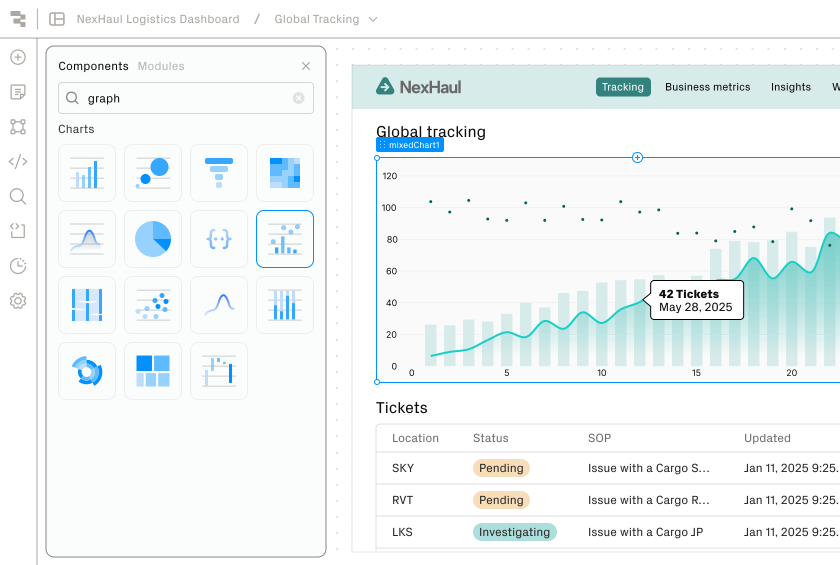
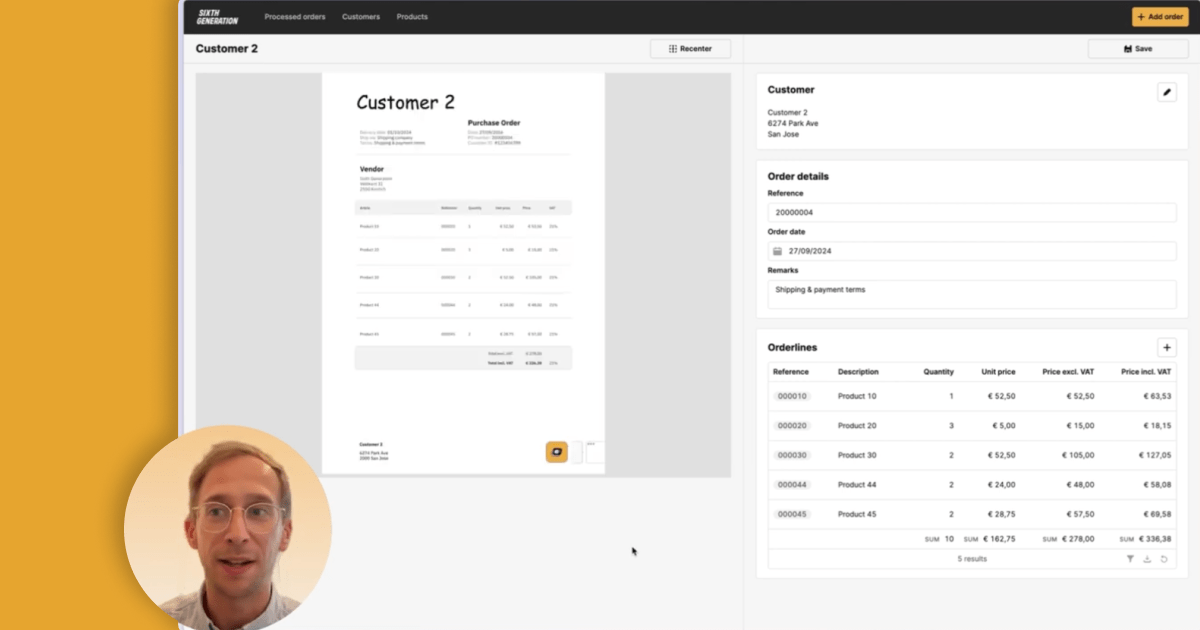
A glimpse of what building with Retool looks like.
What does Retool offer beside app building?
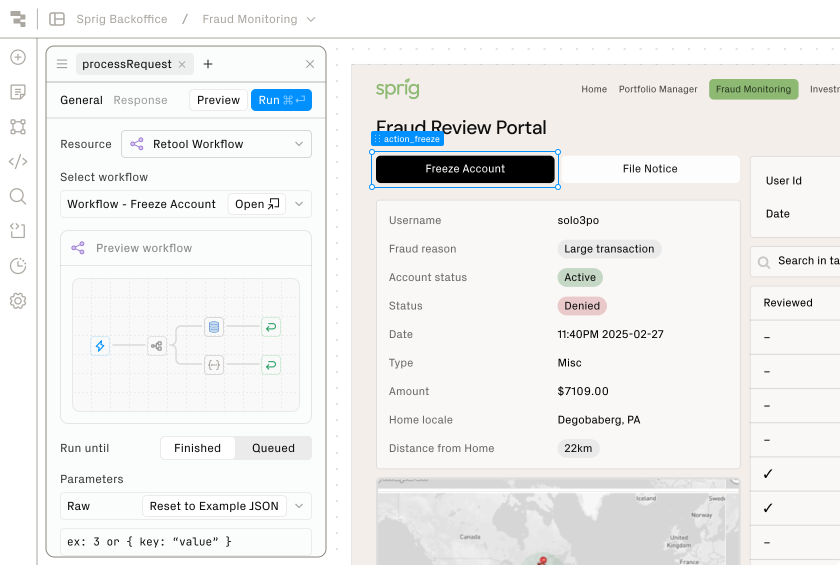
Workflows automate backend processes across apps, systems and teams, on a schedule or in response to events, with built-in monitoring and retries.
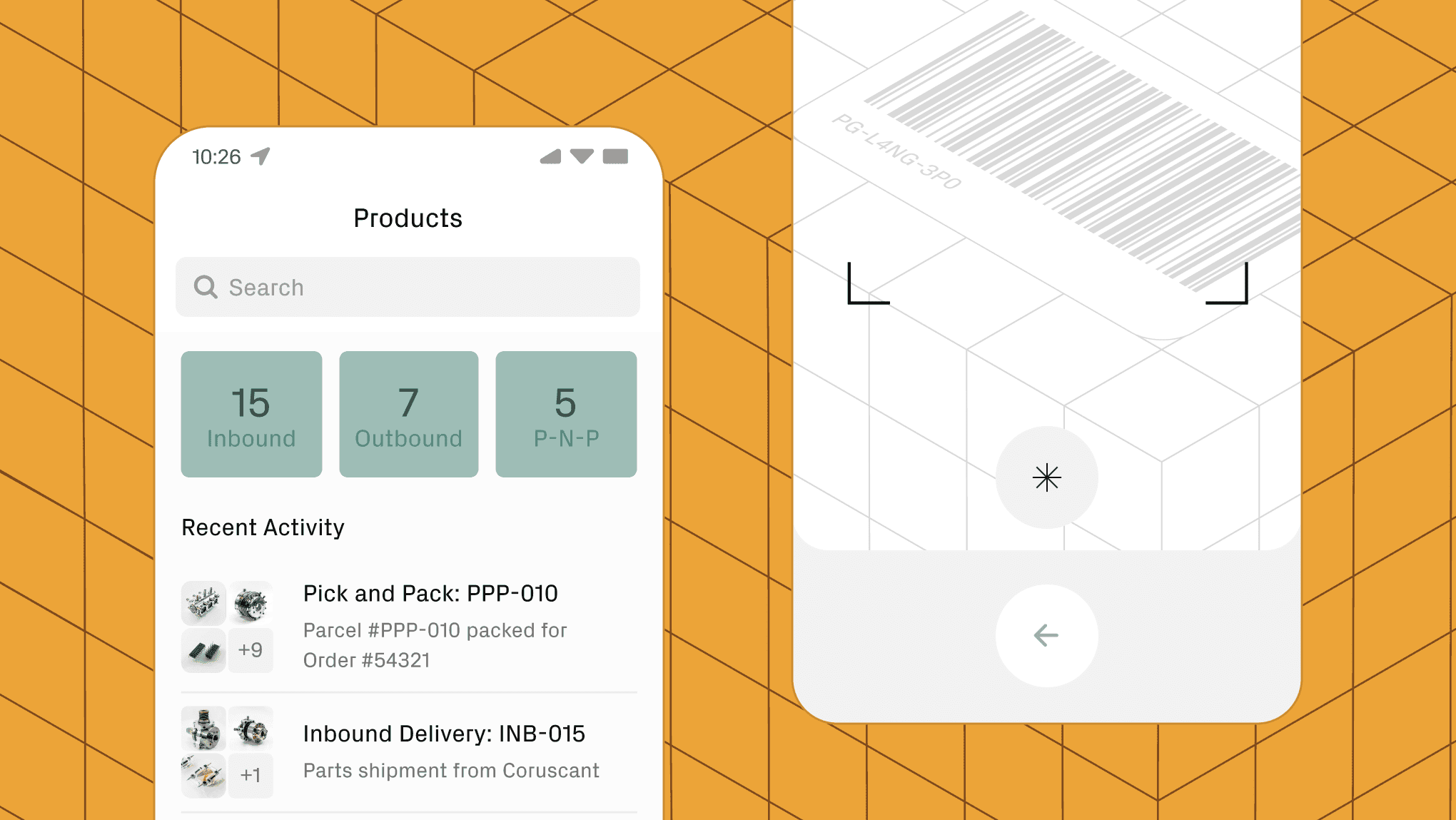
Mobile Apps built in Retool give iOS and Android users features like barcode scanning, offline sync, and easy data entry in the field.
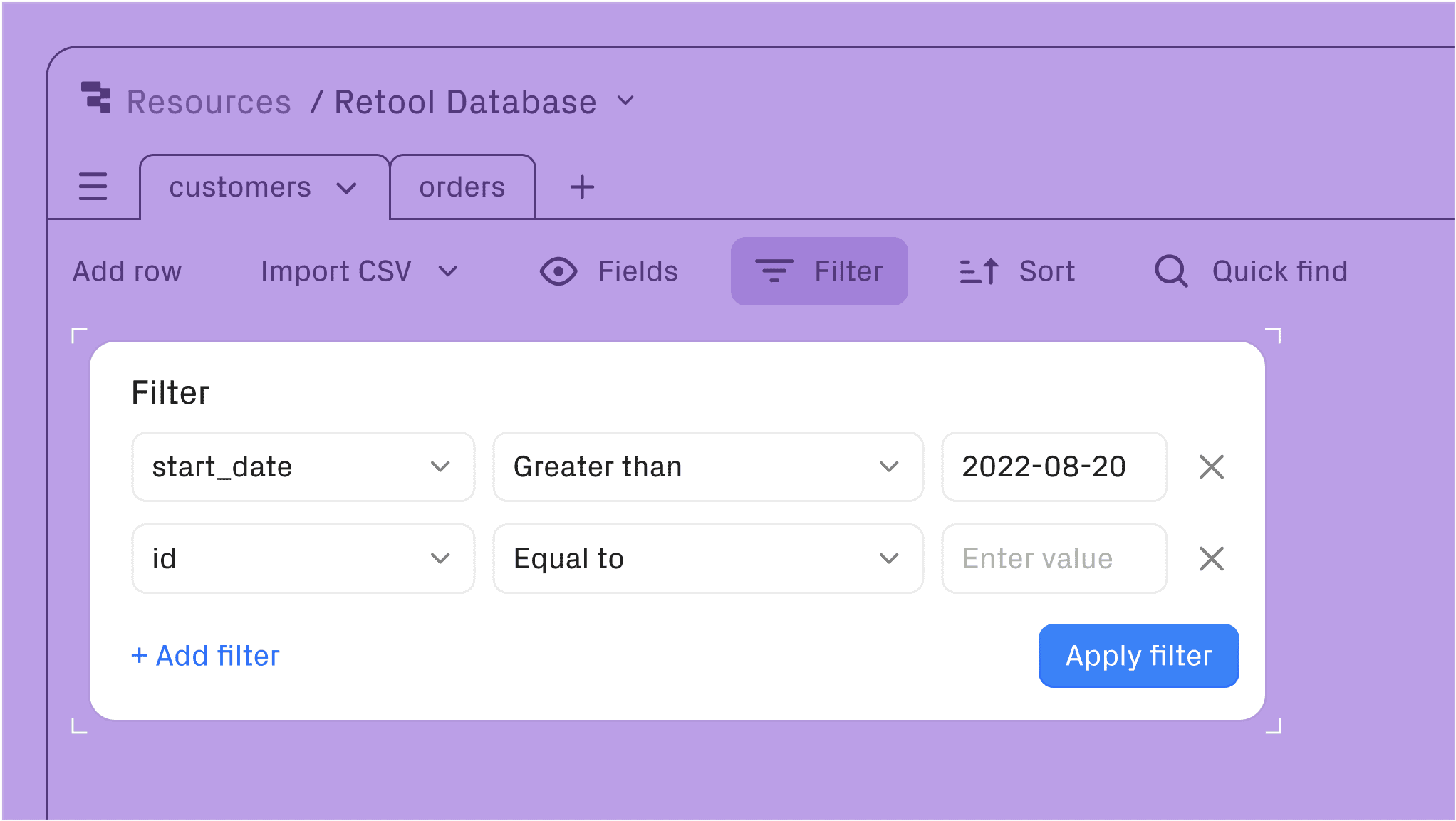
Database provides a fully managed Postgres backend you can query, edit, and manage directly from Retool’s interface.
External Apps let you publish secure, branded portals for clients or partners, or embed apps in other systems, with custom domains and branding.
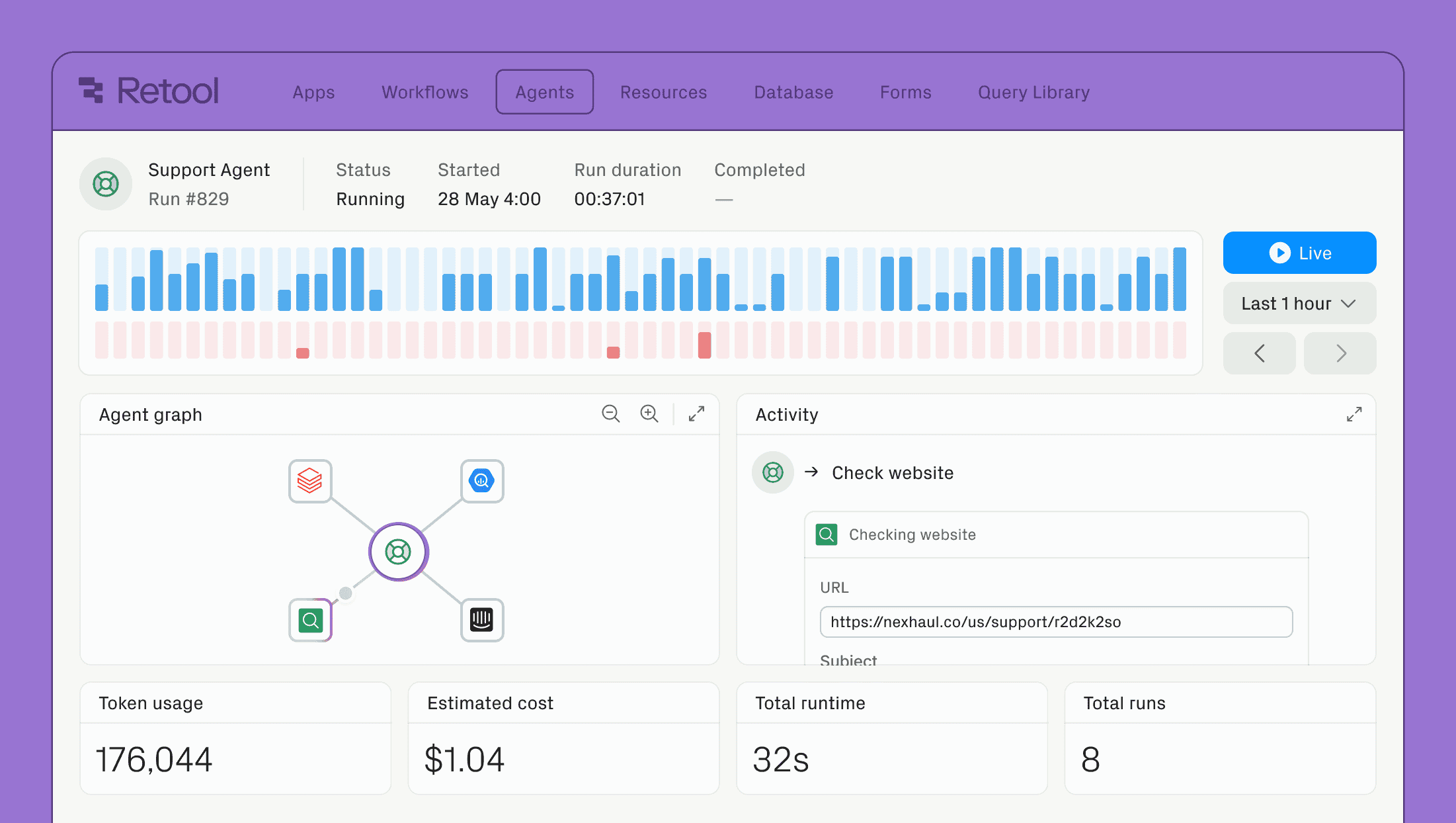
Agents combine models from OpenAI, Anthropic, Google and others with your APIs and databases to run multi-step work, monitored for activity, cost and quality. Retool’s new agent harness, in early access, brings governed agents to Slack, Teams and Google Chat.
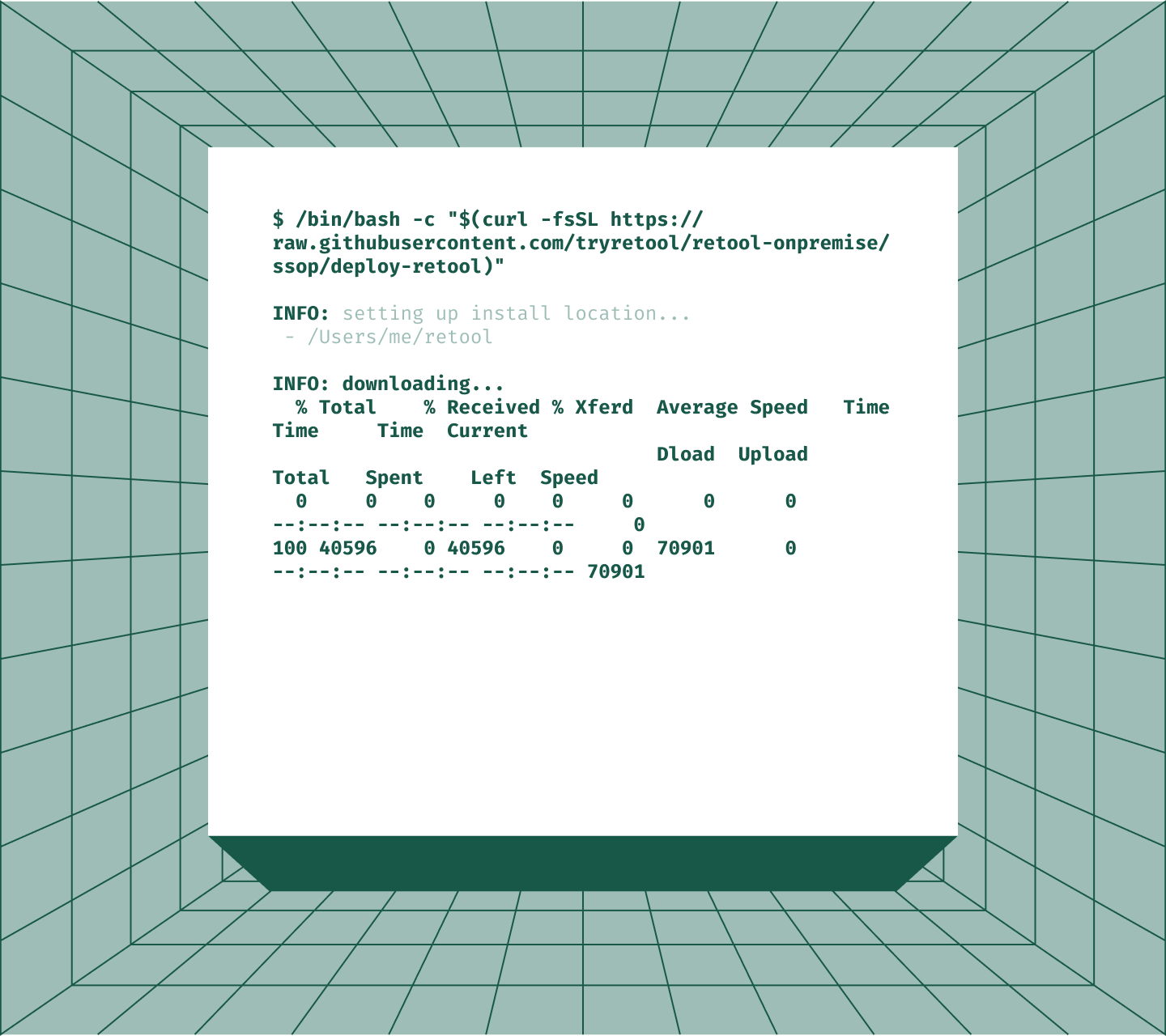
Self-Hosting gives you the option to run Retool entirely in your own VPC or on-premises, with the same governance layer as Retool Cloud.
Retool as the governance layer for AI
Most teams now have AI working in pockets: a chatbot here, a vibe-coded app there, an agent running on someone’s laptop. The hard part isn’t getting a model to respond. It’s getting AI to act inside your business processes with audit logs, permission boundaries, and a clear cost line. That’s the gap Retool is built to close.
Retool sits between your AI and your business systems. Permissions are attached to your data sources and enforced by the platform, so an app or agent can only reach what its user is allowed to reach. With the agent harness, every tool call passes through a company-controlled gateway, each agent gets its own service account, and audit logs separate what a person did from what their agent did on their behalf.
You’re not locked into a single provider. Retool is model-agnostic: admins choose which OpenAI, Anthropic, Google or open-source models each team can use, and Enterprise customers can bring their own API keys.
In short, Retool doesn’t just add AI to your apps. It gives you the structure, governance, and flexibility to turn AI into a true operational advantage.
Retool sits between your AI and your business systems. Permissions are attached to your data sources and enforced by the platform, so an app or agent can only reach what its user is allowed to reach. With the agent harness, every tool call passes through a company-controlled gateway, each agent gets its own service account, and audit logs separate what a person did from what their agent did on their behalf.
You’re not locked into a single provider. Retool is model-agnostic: admins choose which OpenAI, Anthropic, Google or open-source models each team can use, and Enterprise customers can bring their own API keys.
In short, Retool doesn’t just add AI to your apps. It gives you the structure, governance, and flexibility to turn AI into a true operational advantage.
Retool vs. AI app builders like Lovable, Bolt and v0
Your team has probably already prototyped something in Lovable, Bolt, v0, or Cursor, and the result looked great. The question isn’t whether AI builders can scaffold a UI, because they clearly can. The question is what happens at app number 10, 30, or 100.
Retool no longer treats these tools as rivals: you can build in them and deploy on Retool. The difference is in everything around the code.
Retool no longer treats these tools as rivals: you can build in them and deploy on Retool. The difference is in everything around the code.
- Infrastructure
AI builders make it easy to spin up standalone tools, but scaling to dozens of apps means managing separate deployments, databases, and authentication systems. Retool provides unified infrastructure: one login, one permission system and one place to manage everything. - Governance
The easier it becomes to build applications, the more people will do it, which is great, until you have several tools with inconsistent access controls and no audit trail. On Retool, role-based access, audit logs and data permissions are inherited by every app, however it was built. - Maintainability
AI-generated code can work beautifully at first, but without discipline it becomes a black box. Retool keeps apps in standard React and TypeScript with versioning, environments and rollback, so any developer can review and maintain them.

How do I maintain Retool apps?
Most of an app’s life isn’t the initial build. Dependency updates, security patches, access changes and monitoring are all examples of digital erosion: hidden costs that slowly drain your resources without adding value.
Retool takes much of that burden off your plate. Hosting, authentication, versioning, release management, environment promotion and monitoring are handled by the platform, and access changes are made once, centrally, instead of in every app. Because new apps are standard React code, you can also review changes like any other code.
This means you can invest your budget in what truly matters: building new features that create real impact.
Retool takes much of that burden off your plate. Hosting, authentication, versioning, release management, environment promotion and monitoring are handled by the platform, and access changes are made once, centrally, instead of in every app. Because new apps are standard React code, you can also review changes like any other code.
This means you can invest your budget in what truly matters: building new features that create real impact.
How does Retool pricing work?
Retool offers four plans: Free, Team, Business and Enterprise, in the cloud or self-hosted. The free plan covers up to five users, so you can start building before you talk to anyone.
Pricing is per user, with separate rates for builders and for internal users who only use apps. On Business, the first 50 external users of a portal are free.
Since the AI-first relaunch, every plan also includes a monthly pool of AI credits for generating and editing apps, which grows with the tier, and extra credits can be purchased. Agents are billed separately by runtime hour, with free hours included each month.
A Business license adds audit logging, advanced permissions, unlimited environments and external apps. That makes it ideal for professional teams that want to scale without immediately moving to an enterprise setup.
The Enterprise license adds single sign-on (SSO), source control, usage analytics, white-labelling and the option to use your own model API keys. These are particularly relevant for larger organisations or multi-team deployments.
As an official Retool Agency Partner, Sixth Generation helps you choose a model that fits your use case and organisation.
Pricing is per user, with separate rates for builders and for internal users who only use apps. On Business, the first 50 external users of a portal are free.
Since the AI-first relaunch, every plan also includes a monthly pool of AI credits for generating and editing apps, which grows with the tier, and extra credits can be purchased. Agents are billed separately by runtime hour, with free hours included each month.
A Business license adds audit logging, advanced permissions, unlimited environments and external apps. That makes it ideal for professional teams that want to scale without immediately moving to an enterprise setup.
The Enterprise license adds single sign-on (SSO), source control, usage analytics, white-labelling and the option to use your own model API keys. These are particularly relevant for larger organisations or multi-team deployments.
As an official Retool Agency Partner, Sixth Generation helps you choose a model that fits your use case and organisation.
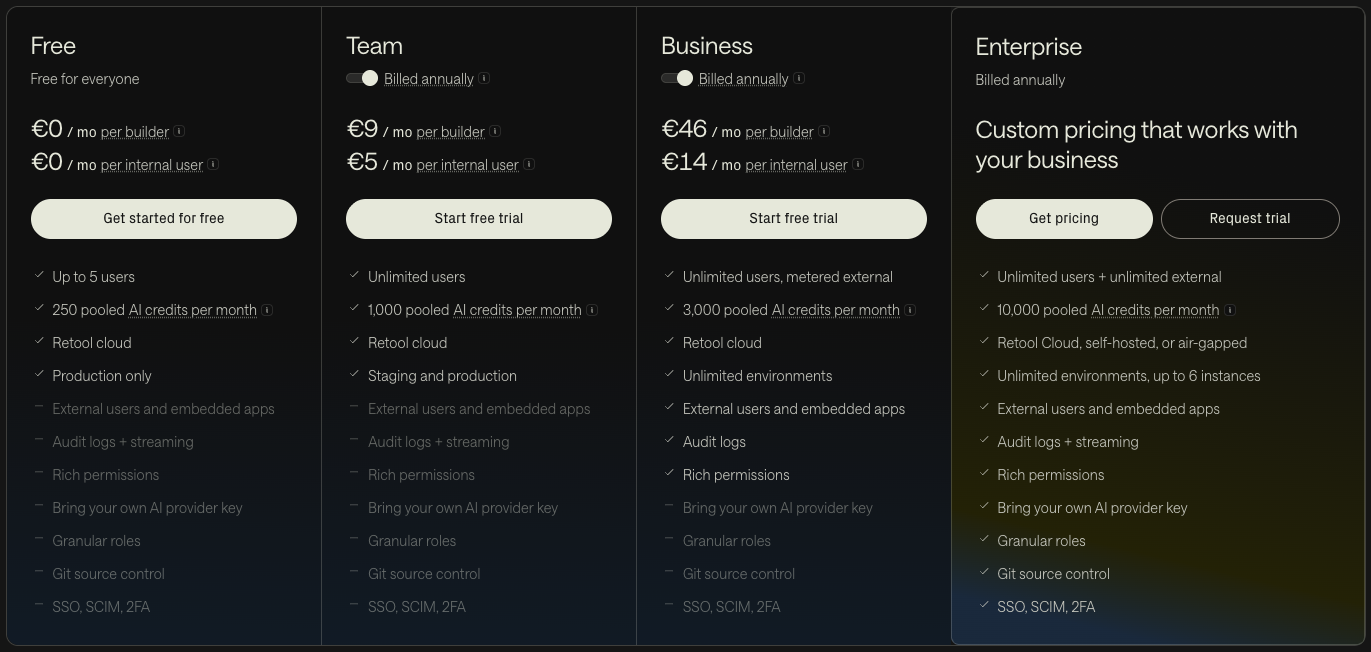
Retool pricing in October 2026.
Why do businesses choose Retool?
Retool is built for teams that want a pragmatic approach to software development.
Some of the highlights:
Some of the highlights:
- It generates real React and TypeScript apps from a prompt, so you get AI speed without a proprietary format.
- Because apps are React code, you can build pixel-perfect, on-brand interfaces instead of settling for a generic admin look.
- It works with the AI tools your team already uses: Claude Code, Cursor, Codex, Lovable and Replit.
- It connects to nearly any database or API, making integration straightforward.
- It takes a security-first approach with SSO, audit logs, RBAC, secrets management, and self-hosting options.
- Apps are production-ready from the first prompt. Access controls and audit logs are inherited, not bolted on after the fact.
- Workflows, agents, mobile apps and portals all run on the same governed platform.
Things to keep in mind:
- You will get the most out of Retool with someone technical who can review generated code, queries and data models.
- AI credits and agent hours add a usage-based element to costs, so keep an eye on consumption.
- It is best suited for business applications rather than public-facing e-commerce or marketing sites.
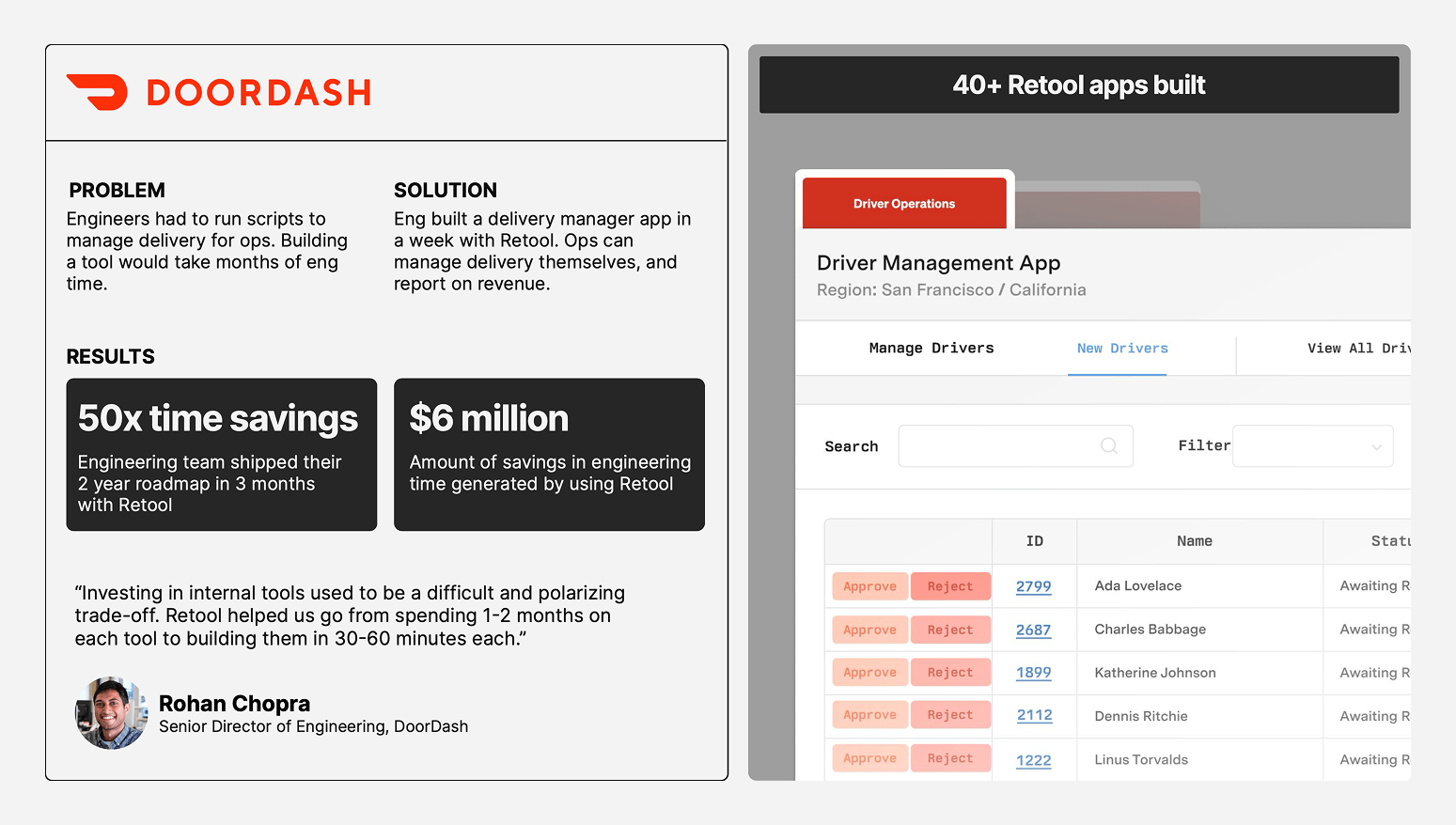
The impact Retool made at Doordash.
Retool vs. Power Apps, Mendix and OutSystems in the AI era
A few years ago, this was a comparison of low-code platforms. Today, all four can generate an app from a prompt: Retool with its AI app builder, Microsoft with Copilot and React-based code apps, Mendix with Maia, and OutSystems with Mentor. So the real differences lie elsewhere:
- Which AI tools you can use. Can your team build with Claude Code, Cursor or Lovable, or mainly with the vendor’s own assistant?
- What the result is. Standard code that any developer can read, or a model that only runs on the platform that created it.
- Where governance lives. In one layer every app inherits, or spread across admin centres, environments and per-app settings.
- Ecosystem and pricing. Which systems you already run on, and how licences, AI credits and agent usage add up as adoption grows.
Platform
Pros
Cons
Microsoft Power Platform
- Copilot plus React-based code apps for developers
- Entra ID, DLP and Conditional Access out of the box
- 1,500+ connectors and deep Microsoft 365 integration
- Familiar to citizen developers
- Code apps require Premium licences for every end user
- Best value only inside the Microsoft ecosystem
- Code apps still lack features such as Git integration
- Governance can be cumbersome at scale
Retool
- Generates standard React and TypeScript apps from a prompt
- Build with any AI tool, including Claude Code, Cursor and Lovable
- Can integrate with nearly any database or API
- One governance layer inherited by every app and agent
- Benefits from someone who can review generated code
- AI credits and agent hours add usage-based costs
- Built for business apps, not consumer products
Mendix / OutSystems
- AI assistants generate data models, logic and UI
- Full lifecycle management for large app portfolios
- Building blocks for governed AI agents
- Proven enterprise scalability
- Apps live in a proprietary model, not standard code
- Vendor lock-in risk
- Resource-intensive, often with specialised developers
Microsoft Power Platform
Pros
- Copilot plus React-based code apps for developers
- Entra ID, DLP and Conditional Access out of the box
- 1,500+ connectors and deep Microsoft 365 integration
- Familiar to citizen developers
Cons
- Code apps require Premium licences for every end user
- Best value only inside the Microsoft ecosystem
- Code apps still lack features such as Git integration
- Governance can be cumbersome at scale
Retool
Pros
- Generates standard React and TypeScript apps from a prompt
- Build with any AI tool, including Claude Code, Cursor and Lovable
- Can integrate with nearly any database or API
- One governance layer inherited by every app and agent
Cons
- Benefits from someone who can review generated code
- AI credits and agent hours add usage-based costs
- Built for business apps, not consumer products
Mendix / OutSystems
Pros
- AI assistants generate data models, logic and UI
- Full lifecycle management for large app portfolios
- Building blocks for governed AI agents
- Proven enterprise scalability
Cons
- Apps live in a proprietary model, not standard code
- Vendor lock-in risk
- Resource-intensive, often with specialised developers
In short: if your organisation runs on Microsoft 365, Power Apps is the natural first stop. If you are building a large portfolio of complex, long-lived applications with a dedicated team, Mendix or OutSystems fit that scale. If you want AI-driven speed with standard code, freedom to use any AI tool, and enterprise control over everything your teams build, Retool strikes that balance.
Quick answers
What is Retool?
Retool is an AI app builder and enterprise platform for internal software. You describe an app in plain English and Retool generates a React and TypeScript application connected to your own data, with authentication, permissions, audit logs and deployment handled by the platform.
Is Retool still a low-code platform?
Not primarily. Since June 2026, new Retool apps are real React and TypeScript code, generated by AI and editable by hand. The drag-and-drop editor still exists for "classic apps", but Retool now positions itself as an AI-first platform that governs and runs software, however it was built.
What happens to my existing (classic) Retool apps?
They keep working as they do today. Retool has committed to supporting classic apps for at least two years after the new app builder becomes generally available, and offers a conversion path to the new builder.
Can I deploy apps built with Lovable, Cursor or Claude Code on Retool?
Yes. You can import an existing React app from Lovable, Replit, v0, GitHub or a local repository, or build directly from Claude Code, Cursor or Codex through the Retool MCP server or CLI. Imported apps inherit your organisation’s permissions, data policies and audit trail.
Do I need coding skills to use Retool?
No to get started: the app builder generates a working app from a prompt. Yes to get the most out of it: someone who can read React, SQL and a data model will catch mistakes, review generated code and keep apps maintainable over time.
Is Retool free?
Retool has a free plan for up to five users with a monthly allowance of workflow runs and AI credits. Paid Team, Business and Enterprise plans are priced per builder and per internal user, with larger AI credit pools and governance features such as audit logs, SSO and source control.
How are Retool Agents billed?
On runtime: the wall-clock time from when an agent is triggered until it returns, excluding time spent waiting for human input. Rates differ per model, every plan includes free agent hours each month, and you can connect your own model provider key instead.
Does Retool support MCP (Model Context Protocol)?
Yes, in both directions. Retool Agents can call remote MCP servers, and Retool publishes its own MCP server so AI coding tools like Claude Code, Cursor and Codex can build, edit and deploy Retool apps and manage environments.
Does Retool offer strong security features?
Yes. Retool provides role-based access control, audit logging, secrets management, environments and self-hosting in your own VPC or on-premises, with SSO and source control on the Enterprise plan. These controls live in a central layer, so every app inherits them instead of implementing them.
Retool is an AI app builder and enterprise platform for internal software. You describe an app in plain English and Retool generates a React and TypeScript application connected to your own data, with authentication, permissions, audit logs and deployment handled by the platform.
Is Retool still a low-code platform?
Not primarily. Since June 2026, new Retool apps are real React and TypeScript code, generated by AI and editable by hand. The drag-and-drop editor still exists for "classic apps", but Retool now positions itself as an AI-first platform that governs and runs software, however it was built.
What happens to my existing (classic) Retool apps?
They keep working as they do today. Retool has committed to supporting classic apps for at least two years after the new app builder becomes generally available, and offers a conversion path to the new builder.
Can I deploy apps built with Lovable, Cursor or Claude Code on Retool?
Yes. You can import an existing React app from Lovable, Replit, v0, GitHub or a local repository, or build directly from Claude Code, Cursor or Codex through the Retool MCP server or CLI. Imported apps inherit your organisation’s permissions, data policies and audit trail.
Do I need coding skills to use Retool?
No to get started: the app builder generates a working app from a prompt. Yes to get the most out of it: someone who can read React, SQL and a data model will catch mistakes, review generated code and keep apps maintainable over time.
Is Retool free?
Retool has a free plan for up to five users with a monthly allowance of workflow runs and AI credits. Paid Team, Business and Enterprise plans are priced per builder and per internal user, with larger AI credit pools and governance features such as audit logs, SSO and source control.
How are Retool Agents billed?
On runtime: the wall-clock time from when an agent is triggered until it returns, excluding time spent waiting for human input. Rates differ per model, every plan includes free agent hours each month, and you can connect your own model provider key instead.
Does Retool support MCP (Model Context Protocol)?
Yes, in both directions. Retool Agents can call remote MCP servers, and Retool publishes its own MCP server so AI coding tools like Claude Code, Cursor and Codex can build, edit and deploy Retool apps and manage environments.
Does Retool offer strong security features?
Yes. Retool provides role-based access control, audit logging, secrets management, environments and self-hosting in your own VPC or on-premises, with SSO and source control on the Enterprise plan. These controls live in a central layer, so every app inherits them instead of implementing them.
How Sixth Generation helps
We make sure you get the most out of Retool, from first prototype to enterprise rollout.
As an official Retool Agency Partner, we help you:
As an official Retool Agency Partner, we help you:
- Evaluate your needs and pick the right setup.
- Design the architecture, data flows, and integrations.
- Build apps that work today and adapt to tomorrow.
- Decide which classic apps to keep, convert or rebuild.
- Bring vibe-coded prototypes under proper governance.
- Train your team to build with Retool and AI effectively.
- Provide ongoing support and scaling guidance.
If you’re ready to move from scattered spreadsheets to powerful, cohesive platforms, let’s talk.